Determination of Heat of Hydration
Operation
The determination is done
by placing fresh concrete in the Heat-Box and afterwards registers the rise and
decay of the temperature.
The procedure should take place
in a room where the temperature is not changing more than ±
If the initial temperature
of the concrete is lower than the room temperature, then the heat development
will be slightly overestimated. If, for example, the initial temperature of the
concrete is 10 °C (18 °F) lower than the room temperature, temperatures are
overestimated in subsequent simulations by up to approx. 0.2 °C (0.36 °F).
These conditions should be
considered when deciding where to place the Heat-Box.
For acclimatization, the
Heat-Box should be placed in the room 8 hours before operation, with the lid
open.
1. Initialize the datalogger as
described here.
2. Disconnect the datalogger from the
PC.
3. Connect the thermocouple with long
cord to terminal 1 and the other one to terminal 2, on the datalogger.
4. Attach the data logger on the front
plate using the pre-mounted Velcro fastener.
5. Lead the blue cord to the void at the front panel. Fix the cord to avoid squeezing, by means of the tapes.
6. Place the thermocouple inside a brass spear, with its soldering at the closed end.
7. Use a can of the same type as used for
calibration.
8. Place the fresh concrete in the can
and mount the closed end of the brass spear app. at the centre of the can.
9. After the brass spear has been
placed ensure by vibration that the compression of the sample is good.
10. The total weight should be
determined (concrete and can).
Try to perform the next 3 steps as quickly as possible.
It is important to use the start button instead of just using a data logger which already is running. This ensures that the initial time and temperature is correct.
11. Place the can in the Heat-Box by
means of the lifting belt.
12. Press the “Go”-button on the
datalogger until the display shows “Record” after app. 3 seconds.
13. Close the lit of the Heat-Box. Do
not squeeze the cord or the lifting belt.
14. The display of the datalogger is
showing the temperature of the concrete.
15. When the display is showing that the
temperature after reaching maximum has dropped to approx.
16. If the result of the analysis shows
that the hydration process has reached its end, you can finish the measurement.
Otherwise, the measurement must continue for a while, then repeat the
analysis.
Analysis of measurement in relation to determination of heat of hydration
Launch the Heat-Box
software from Start-All Programs-Heat-Box Heat-Box.bat.Then the window in
figure 7 will appear.
|
|
|
Figure 7 |
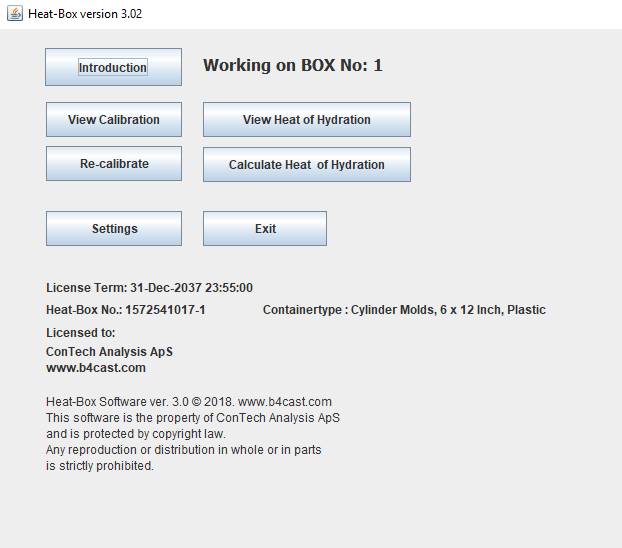
Click on the Calculate Heat
of Hydration button, select the id-number of the Heat-Box you want to work with
and the window in figure 8 will appear:
|
|
|
Figure 8 |
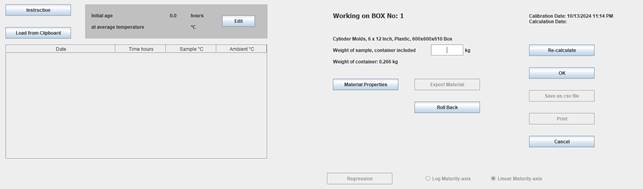
Measuring data from the datalogger must be placed on the clipboard as
described here.
To load measuring data, go to this.
When measuring data has been loaded, Figure 9:
|
,
|
|
Figure 9 Observed temperatures in sample and in the surroundings |
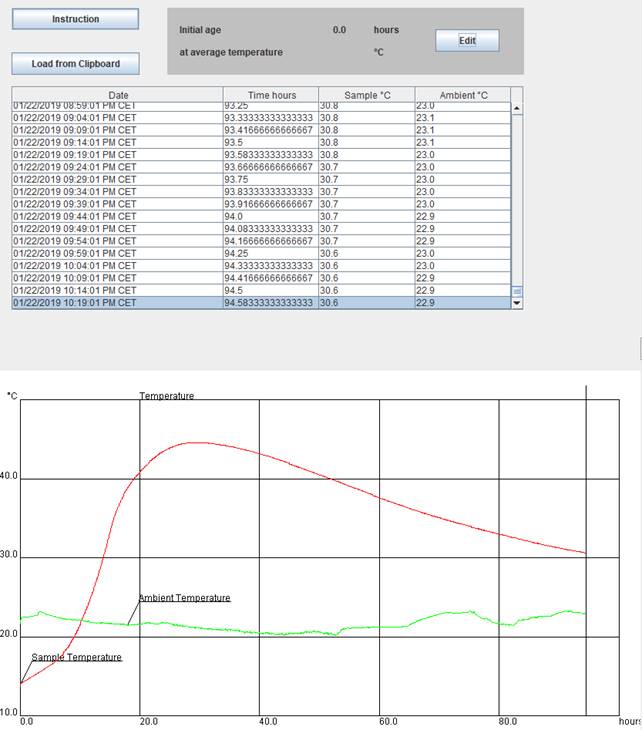
When measuring data has been loaded:
- It is possible to specify the
period between mixing of the concrete and the start time of the test. By
also specifying the average temperature of the concrete during this
period, the maturity achieved before the test begins, is built into the
maturity axis of the heat development.
- Fill in the Material Properties and the weight.
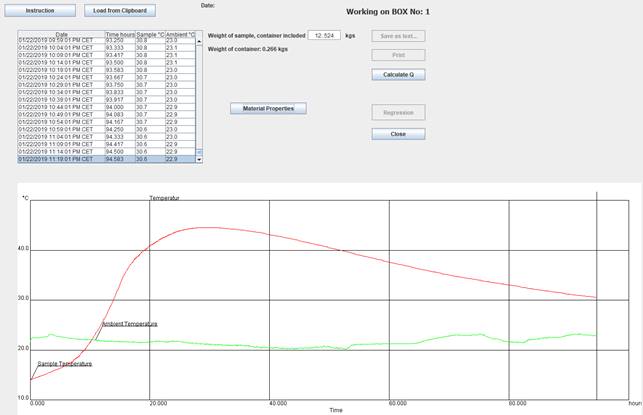
- Press the Calculate Q button
- The calculation will last some
minutes. During the calculation is shown how the calculation model is
fitting to the measured data. In addition, the progress of the Heat of
Hydration is shown continuously. See figure 10.
- When the calculation is ended
and you find the compliance between measured and calculated temperatures
being alright, you can save the result. It is possible to present the Heat
of Hydration curve with a linear or logarithmic maturity axis.
ATTENTION!
If the hydration process has reached its end, the Heat of Hydration
(Fig. 10 curve at right) has stopped developing. This is most easily determined
by selecting the linear Maturity-axis. If the Heat of Hydration has not stopped
developing, the measurement must continue for a while, then repeat this
analysis.
- After saving the result, you
will get the opportunity to save the data describing the Heat of Hydration
in a text-file (csv format). The datafile is meant to be used as input for
thermal simulation of concrete structures. Alternatively, you can
approximate the data with a model by means of a Regression
Analysis.
Note: The result is Heat development (energy) per weight-unit of cement
or powder content per volume-unit of concrete, as defined in Material Properties.
- Finally, you can print sheets for your archive.
|
|
|
Figure 10 Based on the determined Heat of Hydration (as a function of maturity) in the right figure, is in the left figure shown that the calculated and the observed temperatures are coincident. |
If you make
a change in parameters and this results in the calculated heat generation being
discarded, you can undo your latest changes by using the Roll Back button.
If you want to return to your original starting point, use the Cancel button.